Edit a Santa Costume for Dog Photos (No Clothes Needed)
Get a festive Christmas portrait of your dog without the stress of real clothes. Learn how to edit a realistic Santa costume onto your pet's photo using simple apps.
 DevForge Studio
6 min read
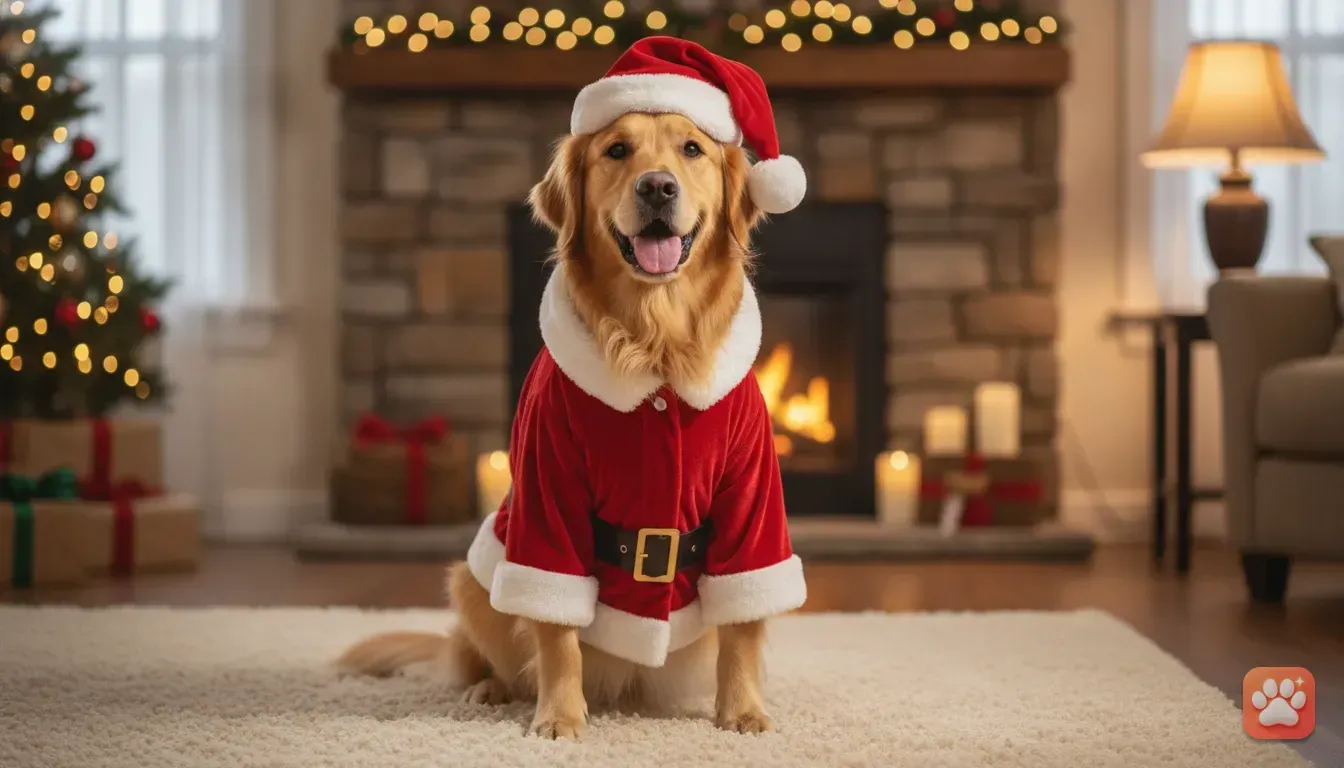
Getting a dog into a real Santa suit is usually a wrestling match. They hate the hats, chew the fake belt, and look totally miserable by the time you press the shutter. You can avoid this mess and learn how to edit a Santa costume for dog photo (no real clothes needed) using just your phone.
We've all seen perfect pet portraits on Instagram and wondered how the dog sat so still. The truth is simple. Those outfits aren't real.
You can take a normal picture of your dog and dress them up digitally with basic editing tricks or apps. We are going to walk you through exactly how to do this.
Why skip the physical Santa suit this year?
Buying a physical costume seems fun until you actually try to put it on. Pet costumes are a nightmare to size. A medium in one brand fits a pug, while another brand's medium is built for a golden retriever.
You'll often end up with a suit that's way too tight around the chest. Dogs also overheat fast in thick polyester. That discomfort makes them pant heavily, which ruins the calm portrait look you actually want.
Then there's the cost. You might spend good money on an outfit they'll wear for three minutes before shaking it off. Digital editing saves money, spares your dog's nerves, and gives you a much better final result.
How to take the perfect base photo
You need a great base photo before you open any editing app. If you start with a blurry or dark shot, a digital Santa suit just looks like a cheap sticker. You don't need a pro camera for this.
Find the right lighting
Lighting makes or breaks pet photography. Don't use your phone flash. It creates harsh shadows and gives dogs glowing alien eyes.
Face your dog toward a large window during the day instead. Soft, natural light illuminates their fur and makes their eyes pop. When the base light is natural, your digital costume blends in perfectly later.
Get down to their eye level
Shooting from above makes dogs look small and distorts their bodies. That awkward angle makes fitting a digital costume almost impossible. You have to get on the floor.
Lie on your stomach so your phone lens is exactly at their eye level. This simple trick instantly makes the portrait look professional. It also gives you a clear view of their chest and shoulders for the digital suit.
Use a high-value treat
Hold a tiny piece of cheese right next to your phone lens. Don't let them eat it yet.
Make a funny noise to get their ears up, then take a burst of photos. Pick the shot where they have a relaxed, slightly open mouth and focused eyes.
Method 1: Editing a costume manually with sticker apps
You can use free apps like Canva or Picsart to manually paste a Santa outfit onto your dog. It takes patience. However, it works well for a simple Santa hat or scarf.
Step 1: Remove the background. Upload your base photo into the app. Use the background remover tool to isolate your dog so you don't mess up your living room background while editing.
Step 2: Find a costume sticker. Search the library for a 'Santa hat' or 'dog Santa suit'. Match the angle of the sticker to your dog's head.
Step 3: Resize and position. Drag the hat onto their head, paying close attention to the ears. If you have a pointy-eared breed, use the eraser tool to rub out a small piece of the hat so one ear pops through naturally.
Step 4: Adjust the colours. Digital stickers are usually way too bright out of the box. Drop the saturation and tweak the brightness so the hat doesn't glow artificially in a dim room.
Method 2: Using an AI pet portrait app
Manual editing is fun but often looks like a cartoon sticker on a real photo. If you want a genuine studio result, an AI tool designed for pets is faster and much more realistic.
Generic photo apps usually mess up animal faces by changing unique spots or eye colours. We built our app, Furstume AI, to solve this specific problem. We made sure it keeps your pet's exact fur colour and markings exactly as they are.
Here is how we recommend using it for a Santa photo:
- Upload one clear photo: Pick that great eye-level shot you just took on the floor. Make sure their face is sharp.
- Pick the Santa Paws costume: Browse our 100+ costume options. We included a detailed Santa Paws outfit with soft velvet textures and realistic studio lighting.
- Let the app work: Tap generate and wait a few seconds. The app builds a professional portrait around your dog's real face.
Your first portrait is totally free to try. You can earn more credits just by using the daily check-in or watching short ads. You can also add multiple pets to a single profile, which is highly requested by people with both dogs and cats.
Common mistakes to avoid when editing digital pet outfits
There are a few common pitfalls that ruin festive photo edits. Watch the neck proportions closely. People often make the digital suit too small, which gives the dog a massive, floating head.
The Santa collar needs to sit right where their real collar normally rests. Second, don't hide their unique features. If your dog has a crooked tooth or a distinct spot, don't cover it up.
Finally, keep the original background clean. A Santa suit placed over a messy kitchen looks terrible. Use a plain wall, or pick a festive backdrop like a cozy fireplace inside the app.
For more staging inspiration, read our guide on the best Christmas costume ideas for dogs and cats photos.
Fun ways to use your dog's new Santa portrait
Don't just leave that perfect Santa portrait sitting in your phone. Use the high-quality image for custom digital Christmas cards. Send them out in family WhatsApp groups.
They always get a huge reaction compared to boring store-bought cards. Instagram Reels and TikTok are also great places to show off the edit.
Post a short video showing the plain 'before' picture on the rug. Then reveal the 'after' Santa portrait. People love seeing a normal Tuesday afternoon photo turn into a festive masterpiece.
You can also take the file straight to a local print shop. Because tools like Furstume save in high resolution, you can print the portrait onto coffee mugs, canvases, or even custom wrapping paper.
Your next steps for a festive pet photo
Getting a brilliant Christmas picture doesn't mean forcing a dog into uncomfortable clothes anymore. You just need a well-lit photo at eye level and a good digital tool.
Grab a few treats and find a spot by the window. Take a fresh photo today.
Try manually adding a hat in a sticker app, or use a pet portrait app to see them transformed instantly. Have fun experimenting and enjoy a stress-free holiday with your dog.
Frequently asked questions
Can I edit a Santa costume onto a cat photo too?
Yes, the exact same photo editing steps and AI tools work perfectly for cats. Just ensure you have a clear, eye-level photo of your cat looking toward the camera.
What is the best free app to edit a Santa hat onto my dog?
If you want to do it manually, Canva and Picsart are great free options that offer festive stickers. For a fully realistic outfit that blends lighting automatically, try an AI pet portrait app.
Will an AI pet portrait app change my dog's fur colour?
Generic AI tools often struggle with this, but specialized apps like Furstume AI map your dog's exact face. This keeps their unique fur colour, markings and eye shape completely intact.
How do I take a good base photo of my dog for editing?
Face your dog toward a window for soft, natural light, and hold a treat right near your phone camera. Crouch down to their eye level so you get a clear, proportionate shot of their face and chest.
Try it yourself
Furstume AI
Turn your pet into Santa, a King, a Chef and 100+ costume portraits.