How to Use an AI Portrait Generator From Photo for Dating
Struggling to get matches? Learn how to turn an everyday selfie into a high-quality dating profile photo using AI.
 DevForge Studio
7 min read

Let's talk about your dating profile. If you use apps like Bumble, Hinge, or Tinder, you know your first photo decides whether someone stops or keeps scrolling. Getting a great shot usually means forcing a friend to take hundreds of awkward pictures or paying a professional.
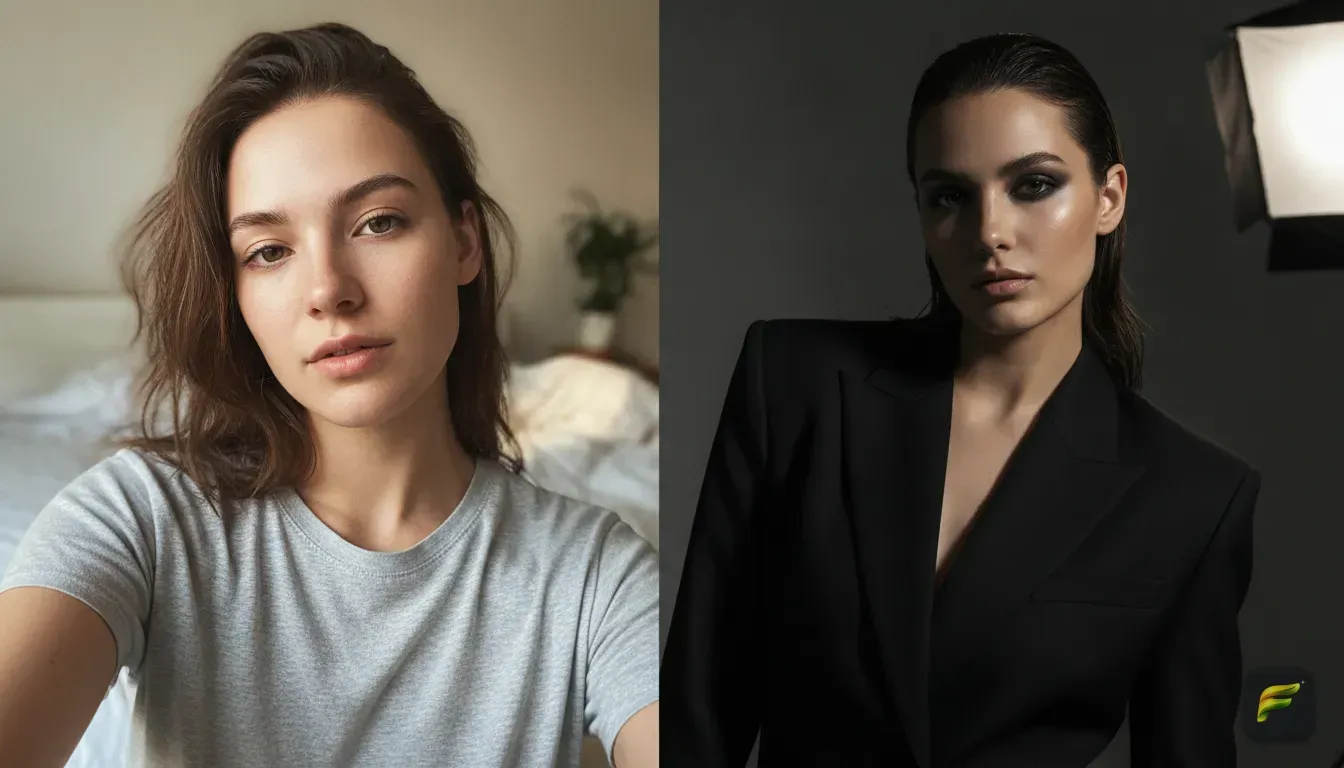
Now, we'll show you exactly how to use an AI portrait generator from photo to upgrade your dating profile in just a few minutes. The app gives you a nicer outfit and fixes the lighting. It keeps your actual face exactly the same.
You just have to pick the right base photo and write the right prompts. We'll walk you through the process and keep your results looking completely real.
Why upgrade your dating photos with AI?
Dating apps are highly visual. A blurry mirror selfie or a badly lit car photo sends the wrong message immediately. An AI tool helps you get a natural, well-dressed lifestyle photo without ever leaving your room.
Think about the dating app algorithms. Profiles with clear, high-quality photos simply get shown to more people. You can test different outfits to see if a casual jacket or a crisp button-down shirt gets more likes.
We often see users swap a messy bedroom background for a sunny coffee shop or a busy city street. The goal isn't to create a fake person. You just want to show the absolute best version of yourself, exactly as you would on a real first date.
Different platforms require different vibes. Hinge users often want lifestyle photos that show personality, like a shot at a park. Tinder users might react better to a sharp, stylish night-out photo.
Using an AI tool lets you create a diverse mix of photos tailored specifically for every app you use. It saves you a ton of time and money.
Choosing the right base photo
If you put a bad photo into an AI editor, you get a bad photo out. Your input photo determines how much the final result actually looks like you.
Here's how to take the perfect base picture:
- Look straight at the camera: AI works best when it can map your facial features clearly. A slight angle is fine, but avoid harsh side profiles.
- Find good lighting: Stand facing a window so natural sunlight hits your face evenly. Dark shadows on one side of your face confuse the AI and change your face shape.
- Keep your face clear: Take off your sunglasses, hats, or scarves. Keep your hair pulled slightly back if it covers your eyes.
- Use a clean background: Stand against a plain wall if possible. This helps the AI separate you from the background accurately.
- Keep the camera at eye level: Avoid low angles that point up your nose or high angles that distort your forehead. Hold your phone directly in front of your face.
Step-by-step: How to use an AI portrait generator from photo
Using an AI tool is simple if you follow a basic process. If you want to try this right now, you can use our app Fotorra AI. We built it specifically for this exact job.
You upload your photo, type what you want, and the app changes your outfit and background. Your face stays completely intact. Fotorra AI processes images securely on your device, and your uploads are never used to train public AI models.
Here's the exact process to follow:
- Upload your base photo: Pick that well-lit, front-facing selfie you just took by the window.
- Pick a template or write a prompt: If you use Fotorra AI, you can tap a ready-made template for instant results. If you want something highly specific, you just type a custom prompt.
- Review the generated options: The AI will create a few versions. Check the small details, like whether the lighting looks natural or the new outfit fits your shoulders correctly.
- Download the best one: Pick the photo that looks the most like you on a really good day. Save it directly to your phone.
If you need more help getting the clothes to look perfect, check out our guide on how to change your outfit in a photo with an AI editor.
Best prompts to copy and paste for dating apps
When you use a custom prompt, you need to describe the setting, lighting, and your outfit clearly. If you leave things blank, the AI guesses, and the results often look weird. Feel free to change the clothing descriptions based on your personal style.
You can swap a navy blue sweater for a floral summer dress, an elegant blouse, or a tailored suit. We also include photography terms like '35mm lens' or 'soft focus' in our prompts. These keywords force the AI to create highly realistic images instead of cartoonish drawings.
Here are five prompts you can copy, paste, and adjust for your own dating profile.
1. The Sunday Coffee Date
Prompt: "A high-quality portrait of a person sitting at a small table outside a bright, sunny coffee shop. Wearing a casual fitted navy blue sweater. Soft natural sunlight, blurred cafe background, shot on 35mm lens, candid and relaxed mood."
Why it works: Coffee shop photos show you're relaxed and approachable. It sets the exact scene for a standard first date.
2. The Evening City Walk
Prompt: "A cinematic portrait of a person standing on a busy city street at night. Wearing a stylish leather jacket over a white t-shirt. Neon city lights blurring in the background, sharp focus on the face, moody and attractive lighting."
Why it works: This adds a bit of mystery and shows you know how to dress for a fun night out in the city.
3. The Clean Studio Look
Prompt: "A professional but casual studio portrait. The person is wearing a crisp olive green button-down shirt. Clean light grey background, soft studio lighting, high resolution, modern and friendly."
Why it works: A clean background makes your face the absolute focus. This is great for your primary profile picture because there are no distractions.
4. The Golden Hour Park
Prompt: "A portrait of a person standing in a green park during golden hour. Wearing a casual white linen shirt. Warm sunset light hitting the face, blurred trees in the background, happy and inviting atmosphere."
Why it works: Warm sunlight makes absolutely everyone look better. It gives off a healthy, active, and outdoorsy vibe.
5. The Bookstore Browser
Prompt: "A cozy portrait of a person standing inside an old bookstore. Wearing a comfortable thick knit cardigan. Soft warm indoor lighting, tall bookshelves blurred in the background, intelligent and calm."
Why it works: It gives potential matches a hint about your hobbies and personality without you having to write a long bio.
The golden rule: Keep it looking like you
When you upgrade your dating profile, remember one crucial thing. You'll eventually meet these matches in real life. If your AI photo looks like a completely different person, the date starts with immediate disappointment.
Don't use AI to change your body shape, give yourself fake abs, or alter your jawline. Use it strictly to fix bad lighting, swap a boring graphic t-shirt for a nice jacket, and remove messy backgrounds. The AI should act like your personal stylist and a professional photographer, not a plastic surgeon.
A good test is to show the generated photo to a friend. If they say you look great today, you nailed it. If they ask who that person is, you need to generate a new photo.
Authenticity is still the most attractive trait on any dating app.
Common dating profile photo mistakes to avoid
Upgrading your main photo with an AI portrait generator from photo is a massive step forward. But the rest of your profile matters just as much. Avoid these common traps when building your final photo lineup:
- Too many group photos: Your match should never have to guess which person you are. Keep group photos to a strict minimum, and never use one as your first picture.
- Hiding your face: Sunglasses, ski masks, and photos taken from fifty feet away make it hard for people to connect with you. Always show your eyes and your smile.
- Over-filtering your selfies: Using heavy Instagram filters makes you look highly insecure. Stick to clean, sharp photos. If you want a specific artistic vibe, check out our tips on getting a cinematic photo edit from an everyday selfie.
- Only using bathroom selfies: A dirty mirror and a toilet in the background get you left-swiped instantly. Take the extra five minutes to generate a good background instead.
Your next move
You don't need an expensive professional photoshoot to get better matches. You just need one or two really good, clear photos that highlight your best self. Grab your smartphone, find a window with bright natural light, and snap a fresh selfie right now.
Run it through your AI editor, try out a few different outfits and locations, and pick your absolute favorite. Update your Bumble, Hinge, or Tinder profile today, and watch how quickly your match rate improves.
Frequently asked questions
Do AI generated photos look fake on dating apps?
Not if you use them correctly. A good AI portrait generator keeps your actual face intact and only enhances the lighting, background, and outfit.
Can I change my clothes in a photo using AI?
Yes. You can type a prompt describing a new outfit, like a leather jacket or a summer dress, and the AI will swap your clothes instantly.
What makes a good base photo for AI generation?
A clear, front-facing selfie taken in good natural light works best. Avoid sunglasses, heavy shadows, and low camera angles.
Are my photos private when I use an AI generator?
It depends on the app you use. Apps like Fotorra AI process your images securely on your device and never use your personal uploads to train public AI models.

Try it yourself
Fotorra AI
Transform photos instantly with AI.