
Festival Photo Ideas You Can Create With an AI Photo Editor
Want a stunning festival outfit photo without buying new clothes? Here are specific AI prompts and styles to try for your next post.
 DevForge Studio
7 min read
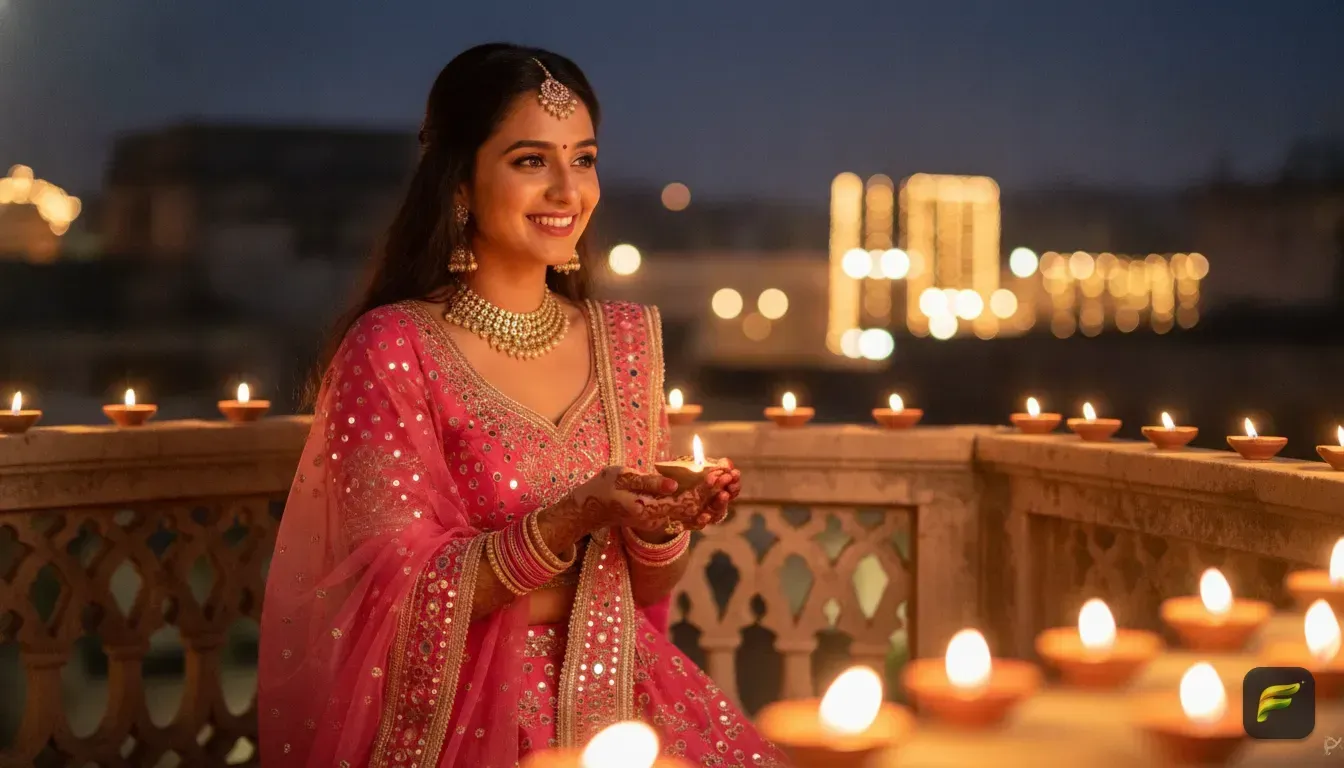
Festivals are the perfect excuse to dress up and take photos. But buying a new outfit for every single event drains your wallet fast. Missing the party entirely or having bad lighting ruin your shots is frustrating.
That is where an AI photo editor app comes in handy. You don't need a photographer or expensive clothes you'll only wear once. You can change your look and background in seconds using photos sitting on your phone right now.
Test out heavy ethnic wear. Try wild makeup looks or put yourself right in the middle of a concert. Here are some festival photo ideas you can create with an AI photo editor, complete with copy-paste prompts.
Start With the Right Base Photo
Before trying out festival styles, you need a good starting point. AI tools need a clear read on your face and body shape. Feed it a blurry, dark photo, and your result will look like a mess.
Keep these three rules in mind when picking your base picture. We see this all the time in the studio.
- Lighting is everything: Face a window or step outside. You want soft, even light on your face. Harsh shadows hide your features.
- Keep a clear face: Take off your sunglasses, hats or heavy scarves. Pull your hair back. The AI needs to map your face properly.
- Wear simple, fitted clothing: If you want to change your outfit in a photo with AI, start with a basic t-shirt. Baggy hoodies confuse the AI about your body shape, making new clothes look bulky.
Need more help setting up your shot? Read our tips on how to choose the right photo for an AI virtual try-on.
Diwali and Ethnic Festival Photo Ideas
Festivals like Diwali, Navratri and Eid are all about rich fabrics and warm lighting. Trying out heavy lehengas or detailed sherwanis is a perfect use for an AI portrait generator from photo. You'll see how you look in designer wear without the painful price tag.
When generating these images, tell the AI exactly what materials and lighting you want. Words like 'silk', 'embroidery', 'glowing' and 'warm' give you that rich atmosphere.
Prompts to try:
- The Balcony Diya Look: A cinematic photo edit of a person wearing a heavy maroon silk lehenga with gold embroidery, standing on a balcony decorated with glowing clay diyas at night, soft warm lighting, festive atmosphere.
- The Elegant Sherwani: Aesthetic photo edit ideas featuring a person wearing a tailored emerald green velvet sherwani with silver thread work, standing in a grand palace courtyard, soft sunset lighting.
Holi and Colour Splash Edits
Holi looks amazing on camera. But taking an expensive phone into a crowd throwing water and powder is just asking for trouble. We've seen too many damaged lenses.
An AI editor lets you create vibrant, messy Holi photos safely from your couch. Focus on bright sunlight and contrasting colours. White clothing acts as a perfect blank canvas for those bright pinks and blues.
Prompts to try:
- The Joyful Colour Splash: A bright outdoor photo of a person wearing a white cotton kurta, covered in splashes of pink and yellow Holi powder, bright afternoon sunlight, joyful expression, soft blurred crowd background.
- The Cinematic Portrait: A close-up cinematic photo edit of a person with streaks of blue and magenta gulal on their cheeks, wearing silver oxidized earrings, bright outdoor lighting, colorful festive mood.
Music Festival and Coachella Vibes
Love the look of big outdoor music festivals? You can create those trending AI photo edits easily. It's all about boho fashion, neon lights and golden hour sunsets.
These make excellent Instagram photo edit ideas or reel covers for your music recaps. Get creative with accessories. Throw in cowboy hats, fringed jackets and tinted sunglasses.
Prompts to try:
- The Desert Sunset Look: A trendy ai photo edit of a person wearing a fringed suede jacket, denim shorts, and round tinted sunglasses, standing in a desert music festival at golden hour sunset, glowing stage lights in the background.
- The Neon Night Concert: A person at a night music concert wearing a sequin top, glitter makeup on their cheeks, illuminated by purple and pink neon lights, dark moody background with laser beams.
Christmas and Winter Holiday Styles
Winter brings a totally different aesthetic. Think cozy textures, falling snow and sparkling fairy lights. If you live somewhere warm, an AI photo editor is the easiest way to fake that classic winter wonderland picture.
Try a vintage photo edit AI style for these winter shots. It gives them a nostalgic, warm film camera feel.
Prompts to try:
- The Cozy Coffee Shop: Vintage photo edit ai style of a person wearing a chunky cream knit sweater and a red beanie, holding a ceramic mug of hot chocolate, sitting in a cozy cafe window with snow falling outside, warm indoor lighting.
- The Christmas Tree Portrait: A clear portrait of a person wearing a green velvet dress, standing in front of a large Christmas tree decorated with warm yellow fairy lights, cinematic studio lighting, soft bokeh effect in the background.
Spooky Halloween and Costume Edits
Halloween gives you a great excuse to try crazy AI photo styles. Stop spending hours on special effects makeup. Don't buy a cheap costume you'll only wear for three hours.
Let the AI do the heavy lifting instead. You can turn yourself into a vampire, a fairy or a retro movie character in one tap.
Prompts to try:
- The Gothic Vampire: A dark cinematic photo edit of a person dressed as a Victorian vampire, wearing a black velvet cape with a red lining, pale skin, standing in a gothic stone hallway lit by moonlight.
- The Ethereal Fairy: Aesthetic photo edit ideas of a person as a woodland fairy, wearing a dress made of green leaves, delicate glowing wings, standing in a misty enchanted forest, magical glowing light.
How to Write Better AI Photo Editing Prompts
Creating your own festival looks from scratch takes a little practice. Knowing exactly how to talk to the AI makes a massive difference. The best AI photo editing prompts follow a simple formula.
Always include these four elements in your prompt.
- The Subject and Clothing: Be specific. Don't just say 'a dress'. Say 'a flowing red silk maxi dress'.
- The Setting: Tell the AI exactly where you are. Use 'a busy night market', 'a snowy street', or 'a professional photo studio'.
- The Lighting: This changes the entire mood of the photo. Try phrases like 'golden hour sunlight', 'neon club lighting', or 'warm candlelight'.
- The Camera Style: Tell the AI how you want the final image to look. Words like 'cinematic photo edit', 'vintage film', or 'high fashion editorial' guide the finish.
Creating These Edits Quickly With Fotorra AI
Writing custom prompts is fun. But sometimes you just want fast results. If you need fresh profile picture ideas done in one tap, use a dedicated app.
We built Fotorra AI to make this process incredibly simple. You don't need to learn complicated photo editing software. The app features curated templates for different festivals, cinematic studio setups and trending styles.
Most AI editors completely change what your face looks like. We fixed that. Fotorra AI keeps your face intact while changing your outfit, hairstyle and background.
Try a new hairstyle or heavy festival makeup before you book the salon.
Privacy is a major concern when using AI filters for selfies. Fotorra AI is private by design. Your uploaded photos are only used to create your edit.
We never use your images to train global AI models. Once generated, your edited photos save directly to your phone.
Ready to Update Your Profile Picture?
You don't need an expensive wardrobe or perfect weather for great festival photos. Start with a clear base photo and a few descriptive prompts. You'll create endless looks for your social media.
Grab a well-lit selfie from your camera roll right now. Open up your AI photo editor. Try one of the Diwali, Holi or Winter prompts above to see how easily you can transform your image.
Frequently asked questions
Do I need a full body photo to change my outfit with AI?
No, a half-body or waist-up photo works perfectly for most outfit changes. Just make sure the clothing you are currently wearing in the photo is relatively fitted so the AI can accurately gauge your shoulders and body shape.
Why do my AI edited photos look fake or painted?
This usually happens if your prompt lacks camera style keywords. Try adding terms like 'cinematic photo edit', 'photorealistic', or 'taken on a DSLR camera' to force the AI away from a cartoon or painted art style.
Can I change the background without changing my clothes?
Yes. When writing your prompt, describe exactly what you are wearing in your original photo, but change the location description. This tells the AI to keep your look similar but place you in a new setting.
Are AI photo editing apps safe to use with my face?
It depends on the app's privacy policy. Always look for apps like Fotorra AI that state your photos are only used to process the edit and are never stored long-term or used to train public AI models.
Try it yourself
Fotorra AI
Transform photos instantly with AI.


